Dimension
1. 목적
섹션 제목: “1. 목적”거리·반지름·위치를 재어 도면에 표시한다. 여섯 종류가 있다.
2. 구성
섹션 제목: “2. 구성”- 점 셋 — 종류에 따라 뜻이 다르다. 글자 자리를 손으로 정하는 방식이면 넷째 점이 더 붙는다.
- 잰 값은 도형에서 파생된다. 접두어·접미어·소수 자릿수·단위로 표시 형식을 정한다.
- 치수선·화살표·연장선 간격이 표현을 정한다.
엔진 엔티티는 c_epd_dim_* 다.
3. 작도 방법
섹션 제목: “3. 작도 방법”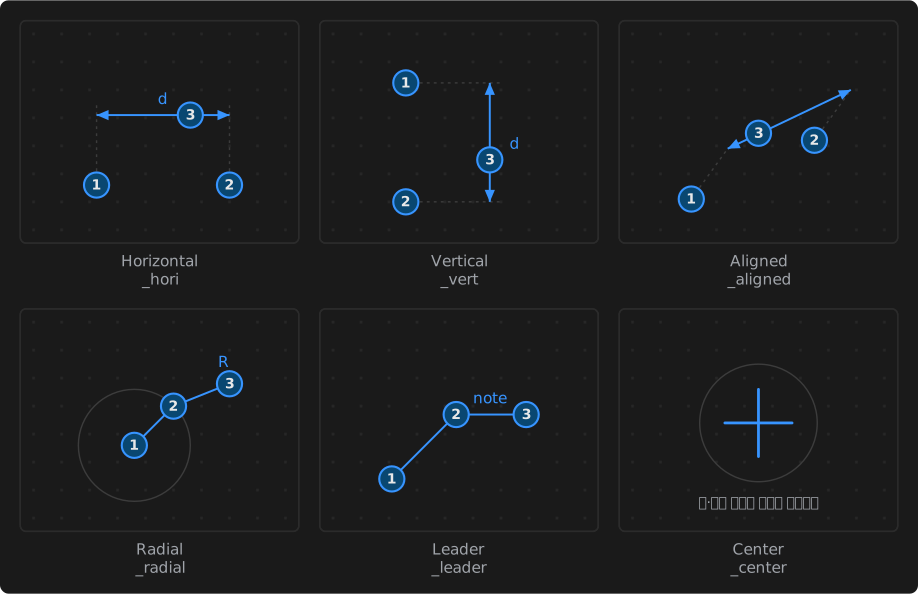
| 방법 | action | 찍는 순서 |
|---|---|---|
| Horizontal | _hori | ① 기준점 ② 기준점 ③ 치수선 높이. 방향이 가로로 고정된다 |
| Vertical | _vert | 위와 같고 방향이 세로로 고정된다 |
| Aligned | _aligned | ① 기준점 ② 기준점 ③ 치수선 높이. 두 점을 잇는 방향을 따른다 |
| Radial | _radial | ① 중심 ② 호 위의 점 ③ 글자 자리 |
| Leader | _leader | ① 가리킬 점 ② 꺾이는 점 ③ 글자 자리 |
| Center | _center | 원·호의 중심을 십자로 표시한다 |
4. 속성
섹션 제목: “4. 속성”속성 패널에 나오는 행이다.
Horizontal · Vertical
| 행 | 그룹 | 편집 |
|---|---|---|
| Type | Info | 읽기 전용 |
| Start | Geometry | 편집 |
| End | Geometry | 편집 |
| Offset | Geometry | 편집 |
| Orientation | Geometry | 편집 |
| Width | Stroke | 편집 |
| Arrow length | Geometry | 편집 |
| Ext offset | Geometry | 편집 |
| Prefix | Format | 편집 |
| Suffix | Format | 편집 |
| Precision | Format | 편집 |
| Units | Format | 편집 |
| Value | Info | 읽기 전용 |
| Font color | Text | 편집 |
| Color | Stroke | 편집 |
행 15개.
Aligned
| 행 | 그룹 | 편집 |
|---|---|---|
| Type | Info | 읽기 전용 |
| Start | Geometry | 편집 |
| End | Geometry | 편집 |
| Offset | Geometry | 편집 |
| Width | Stroke | 편집 |
| Arrow length | Geometry | 편집 |
| Ext offset | Geometry | 편집 |
| Prefix | Format | 편집 |
| Suffix | Format | 편집 |
| Precision | Format | 편집 |
| Units | Format | 편집 |
| Value | Info | 읽기 전용 |
| Font color | Text | 편집 |
| Color | Stroke | 편집 |
행 14개.
Radial
| 행 | 그룹 | 편집 |
|---|---|---|
| Type | Info | 읽기 전용 |
| Start | Geometry | 편집 |
| End | Geometry | 편집 |
| Diameter | Format | 편집 |
| Leader length | Geometry | 편집 |
| Width | Stroke | 편집 |
| Arrow length | Geometry | 편집 |
| Prefix | Format | 편집 |
| Suffix | Format | 편집 |
| Precision | Format | 편집 |
| Units | Format | 편집 |
| Value | Info | 읽기 전용 |
| Font color | Text | 편집 |
| Color | Stroke | 편집 |
행 14개.
Leader
| 행 | 그룹 | 편집 |
|---|---|---|
| Type | Info | 읽기 전용 |
| Start | Geometry | 편집 |
| End | Geometry | 편집 |
| Leader length | Geometry | 편집 |
| Width | Stroke | 편집 |
| Arrow length | Geometry | 편집 |
| Text | Text | 편집 |
| Font color | Text | 편집 |
| Color | Stroke | 편집 |
행 9개.
공통 동작
섹션 제목: “공통 동작”확정하면 도구는 유지된다. 같은 종류를 이어 그릴 수 있으며 Esc 로 도구를 끝낸다.
그리는 도중 Esc 는 그리던 것만 취소하고 도구는 남는다. Backspace 는 마지막 점을 되돌린다.
그리는 동안에도 속성 패널이 값을 실시간으로 보여 준다. 확정 전에는 기하 행이 읽기 전용이고, 확정 후 선택하면 편집할 수 있다.